Mathematical Expression Atlas — A Visual Field Notebook
Open the atlas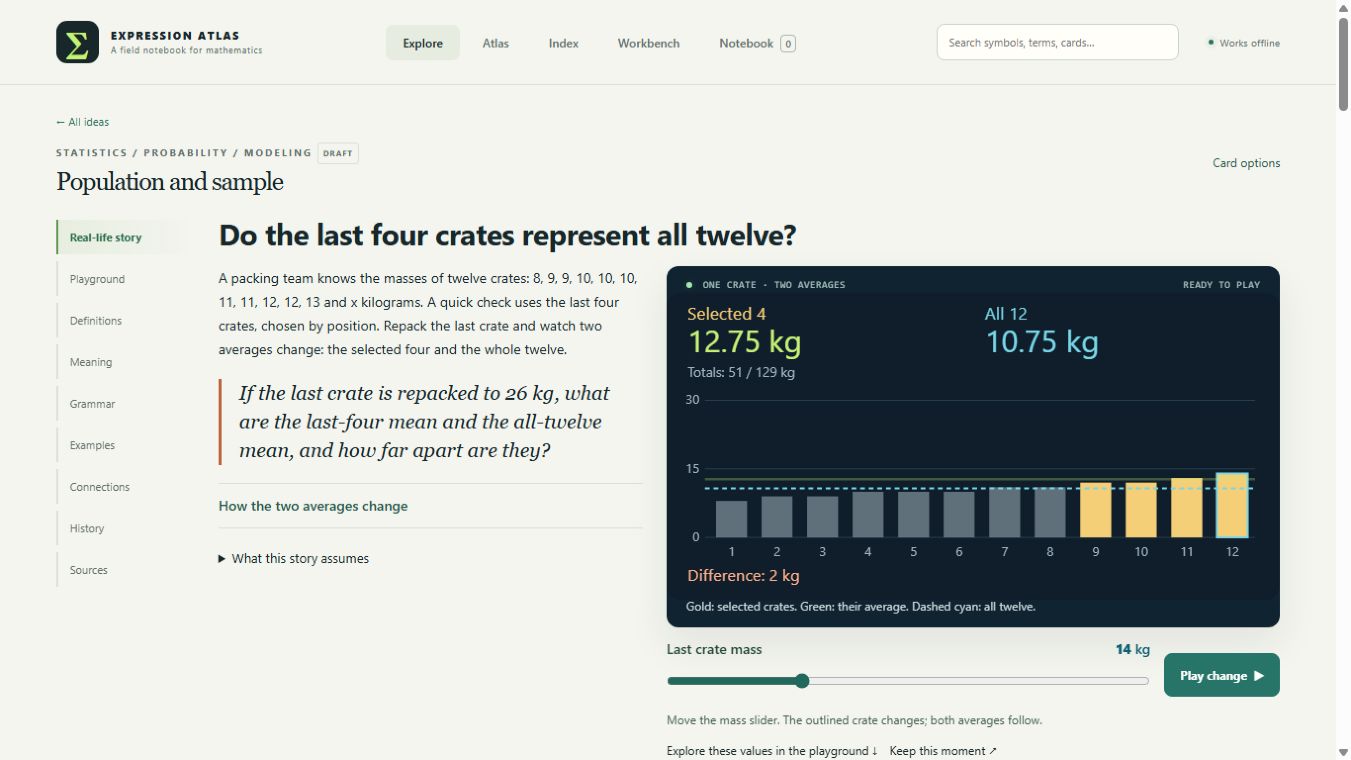
I made the Mathematical Expression Atlas because I really enjoy math. Thinking of it as a way to describe relationships precisely has changed how I see it. I wanted a place to follow those relationships, change something, and see what the expression was saying.
The result is a browser-based field notebook: short stories beside working calculations and interactive visuals. A variable has a place in the explanation, a role in the formula, and a visible effect in the scene.
Try it here
The embedded atlas runs from the same repository-backed demo as the full-screen version.
The problem
A changing number gives me part of the explanation. I also want to see what grew, which direction turned, what stayed fixed, and where an approximation began to miss.
The challenge was to keep those views connected. A story can make an idea approachable, but its numbers need to agree with the formula. A diagram can make a relationship visible, but its shape needs to represent the quantity being discussed. A definition needs to be available when an unfamiliar symbol interrupts the thought.
What I built
Each concept has a small playground with declared inputs, a mathematical model, and distinct visual representations. The shared interface provides controls, smooth motion, readable number updates, comparison pins, and saved experiments.
The stories follow the selected variable through three stages:
- Locate it in a concrete situation.
- Follow its contribution through the calculation.
- Find the resulting change in the visual.
Geometry and Graph views offer different ways to inspect the relationship. Selected lessons also have 3D views where a surface or spatial relationship helps explain the mathematics.
One crate, two averages
One lesson keeps twelve crate weights visible while highlighting a chosen group of four. Initially, the selected crates average 12.75 kg, while the full population averages 10.75 kg.
Move the highlighted crate from 14 kg to 26 kg. The selected mean rises to 15.75 kg; the population mean rises to 11.75 kg. The same twelve-kilogram change is divided by four in one calculation and twelve in the other. Both mean lines move on the chart, at different rates.
The comparison uses the same large “Selected 4 / All 12” readout on phones and desktop, with one mass control. The full playground opens when I want to try other inputs or views.
A map and a reference
The atlas organizes the current collection into eight territories and twenty-four areas. A searchable index explains terms and notation and links them to cards that actually use them. Beneath the search, a collapsible visual catalog lets me browse the full collection of symbols and notation. A learner can move from a symbol to a definition, into a working example, and outward to related concepts.
The topographic map opens with all eight territories visible, including on a phone. Each territory’s summit height represents its available lesson count, with one lesson between contour levels. Elevation describes the collection’s coverage; difficulty and prerequisites belong to the lessons and their connections. Select a territory, then an area, to reach its lessons. The separate Concept connections view explains the relationships between ideas.
Structure that leaves room to grow
Concept records, models, stories, visuals, definitions, and map placement are separate parts. New lessons use the shared host’s controls and animation clock. The application runs locally in a browser without an account, API key, or installation.
Some lessons deepen the thinner parts of the map: conditional probability follows a changing inspection window, variance turns cut-length differences into squared areas, and recurrence repeats a retain-and-refill rule through whole-number rounds. Each uses the shared controls and links its notation back to the index.
The latest sequence follows a library return desk through probability distributions, expected value and entropy. Moving the chance of zero, one or two books changes the probability bars, the weighted balance point and the uncertainty measured in bits. The three lessons share one model, so their stories, formulas and visuals describe the same inputs. They prepare the book roadmap’s broader entropy topics while keeping information entropy distinct from thermodynamic claims.
The reference index is built ahead of time, alongside the offline app. Opening the page uses those prepared links, which removed the long startup wait while keeping definitions and their card references together.
That modularity matters because the front-end design is still developing. I want to improve how an idea feels without rebuilding the mathematics underneath it.
Keeping the demo current
The live demo is built directly from the public repository. Changes to the main branch run the checks and rebuild the atlas before GitHub Pages publishes it. This page links to that deployment rather than maintaining another copy of the card data.
Current state
This is a working learning prototype with an unfinished visual design. The lessons remain drafts; independent mathematical and pedagogical review is still ahead.
The design follows a discipline that also matters in clinical informatics and healthcare AI: declare the inputs, state the model’s limits, and validate its behavior before publishing.
The purpose is personal and practical: make mathematics easier to explore as a language for describing what changes, what relates, and what can be inferred under stated conditions.