I was watching my son use a visual code builder for school.
He was moving blocks, snapping actions together, and seeing what each piece did. He did not have to remember the syntax before he could understand the idea. The structure was visible.
That made me think about SmartPhrases.
In my experience, nurses are often taught where to document, which fields are required, and how to finish the task in front of them. They are not always shown how to build their own documentation tools inside the system.
That difference matters.
A nurse may use SmartPhrases every day without ever being taught how they are assembled. They may know that a dot phrase can insert saved text but not know that @ shortcuts can pull information into that text. They may see a useful phrase made by someone else and assume its more advanced parts require special technical knowledge.
The capability exists.
The path into it is hidden.
The Shortcut Behind the Shortcut
A SmartPhrase is reusable text. That part is easy to explain.
Type a short name, select the phrase, and a larger block of text appears.
But the useful layer goes further. A phrase can also include blanks to fill in, choices to make, and SmartLinks that pull information already stored in Epic. Those SmartLinks commonly appear as names wrapped in @ symbols.
For example, instead of repeatedly typing or hunting for the same chart detail, a writer can place the appropriate SmartLink where that information belongs in the sentence.
The @ is not difficult once someone knows what it means.
The problem is that many people never receive that lesson.
They learn the visible workflow. Open the chart. Find the note. Complete the required sections. Sign.
They do not necessarily learn the construction layer underneath it: how reusable text, live chart references, planned choices, and fill-in-later spaces can work together.
That is not a failure of the nurse. It is a discoverability and education problem.
A Side Tool That Needed Its Own Spotlight
The SmartPhrase Builder did not begin as a standalone project.
I was building something larger around clinical documentation and needed a clearer way to assemble SmartPhrase ideas. The builder started as a supporting tool: a small surface for organizing the pieces before moving the result into Epic.
Then the side tool became the more interesting problem.
The usual way to draft a SmartPhrase is to begin with the finished syntax. That works well for someone who already understands the rules. It is a poor teaching surface for someone who does not yet know what the rules are.
Watching my son use visual code blocks suggested a different approach.
Do not begin with the syntax.
Begin with the parts.
Make the Structure Visible
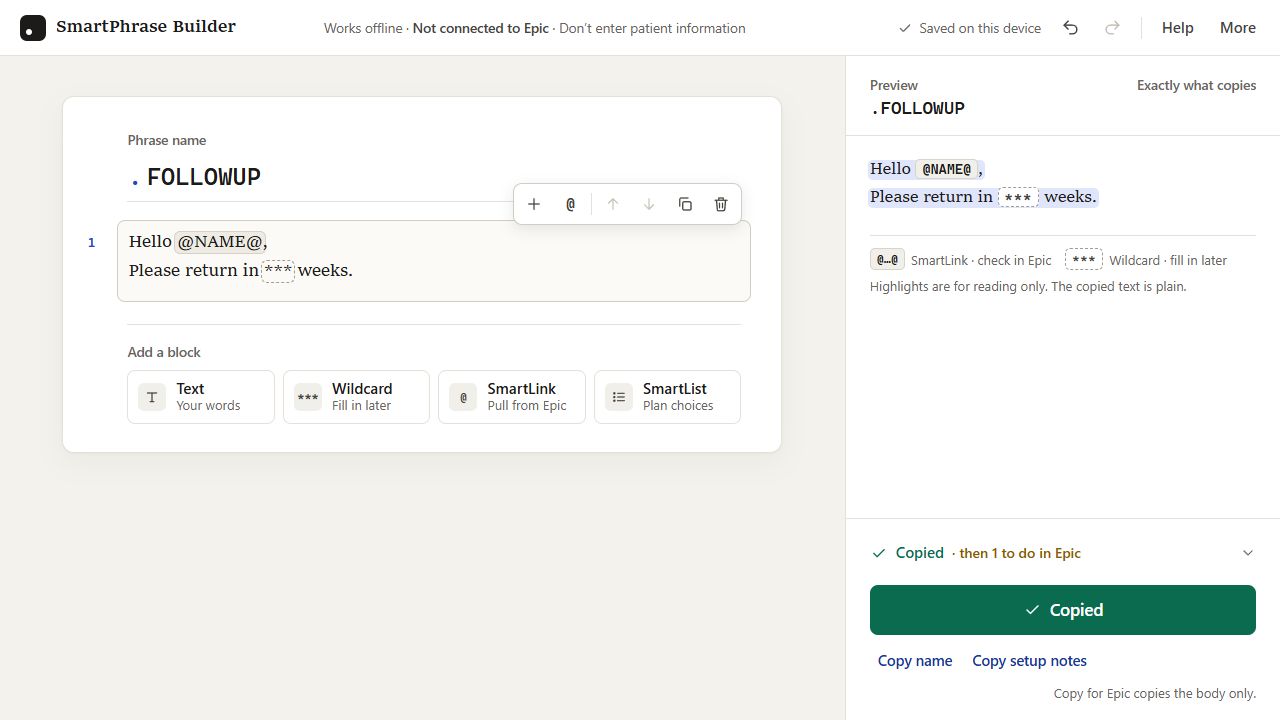
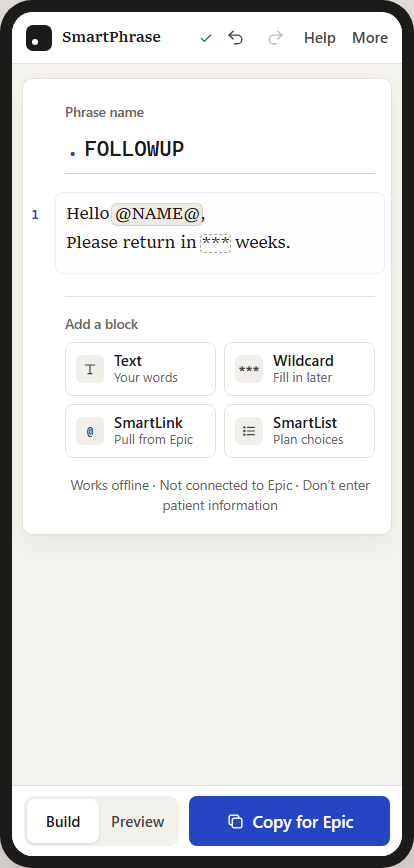
The builder reduces a phrase to four plain choices:
- Text — words you want to keep
- Wildcard — a blank to fill in later
- SmartLink — information to pull from Epic
- SmartList — choices to finish setting up in Epic
Each piece becomes a visible block. The writer can add one, edit it, move it, or remove it. A preview on the other side shows the exact plain text that will copy.
Someone can also type @ inside a sentence to look for a SmartLink without leaving the text they are writing. That interaction matters because it teaches the shortcut at the moment it becomes useful.
The interface is not trying to make the underlying system disappear. It is trying to introduce that system in a form that can be understood before it has to be memorized.
Less Technical Does Not Mean Less Capable
Healthcare software often treats confidence with syntax as if it were the same thing as understanding the work.
It is not.
A nurse may understand exactly what a useful note needs to preserve while feeling uncertain about special characters, naming rules, or the difference between a SmartPhrase, SmartLink, and SmartList. Another person may know the syntax and still build a phrase that adds noise instead of helping the next clinician understand the patient.
Those are different skills.
The goal of the builder is to keep technical familiarity from becoming the admission price for improving a documentation workflow.
That is especially important for staff who do not think of themselves as technical. They should not have to become programmers to reuse a sentence safely, plan a list of choices, or place an existing chart value where it belongs.
A good tool should let their clinical understanding lead.
What the Builder Does Not Do
The builder is deliberately limited.
It does not connect to Epic. It cannot confirm that a SmartLink exists in a particular organization. It cannot publish, approve, or clinically validate a phrase. It should never contain patient information.
It helps someone draft the structure, see what will copy, and keep track of what still needs to be checked.
The final phrase still belongs in an approved Epic training or test environment before anyone relies on it.
That boundary is part of the design. A teaching tool should make the next review step clearer, not create false confidence that the work has already been verified.
The Larger Lesson
SmartPhrases are often described as efficiency tools.
That is true, but incomplete.
Efficiency is not only about making a repeated task faster. It is also about making the better method visible enough that more people can use it.
If only the most technically curious staff discover the shortcuts, the system leaves useful capacity on the table. If the teaching material begins with jargon, the people who could benefit most may decide the feature was not made for them.
Watching my son build with blocks reminded me that complexity does not always need to be removed.
Sometimes it needs to be given a shape.
The SmartPhrase Builder gives the hidden construction layer a visible form. It began as a tool for another project, but it deserved its own spotlight because the training gap was a problem worth showing on its own.
The best outcome is not that everyone becomes more technical.
It is that fewer people are excluded by the way technical knowledge is presented.
Related: SmartPhrase Builder project | Open the live builder | View the source on GitHub
Comments – Addendum Notes
Sign in with GitHub to comment or reply. Comments live as GitHub Discussions on the site repo — no ppeck.me account needed.